Data centres are commissioned harder than any other building type. Integrated systems testing proves that cooling and power survive a failure before the first rack goes live. Then the commissioning team leaves, and the facility starts to change: setpoints move during incidents, units are put in hand for maintenance, sensors drift. Nothing on a standard alarm list tells the operator that N+1 has quietly become N.
This guide is for data centre operators, the facilities and security teams that run them, and the commissioning and controls firms that serve them. It covers what fault detection and diagnostics (FDD) does in a data centre, how to deploy it without opening a control path into operational technology (OT), which cooling faults put redundancy at risk, and where cloud-based FDD is not the right fit.
Key takeaways
- Verification should not end at IST. Integrated systems testing proves the design on day one. Continuous FDD checks that redundancy, temperatures and efficiency still hold every day after.
- Monitoring and control are different risks. Uptime Institute found that nearly half of operators allow remote monitoring of critical OT systems, but only 12% of those allow remote control. FDD needs only the first.
- Read-only by design. A monitoring-only deployment needs one outbound data path and no write permissions. The BMS stays the only system that commands plant.
- The faults that matter are quiet. Standby units that cannot start, overrides left in place, valves that ignore their command and drifting sensors rarely raise an alarm, but each one erodes redundancy.
- Cloud FDD is not for every site. Facilities with a mandated air gap or an on-premise-only software policy need a different approach, and should hear that up front.
What is FDD for data centers, and how is it different from DCIM and BMS alarms?
Fault detection and diagnostics (FDD) for data centres is software that continuously analyses building management system data to find cooling plant faults, rank them by risk and track each one to a verified fix. BMS alarms flag thresholds and DCIM tracks IT assets, power and capacity. FDD checks whether the plant still behaves as designed.
Three systems in a data centre share much of the same data, but they answer different questions. The building management system runs the sequences and raises alarms when a value crosses a limit, which makes it good at catching failures and poor at catching drift, the problem we describe in BMS alarm fatigue. Data centre infrastructure management (DCIM) software is strongest on the IT side: racks, power chains, space and capacity planning.
FDD sits beside both. It runs engineering rules against plant data and compares what the plant is doing with what the design intends: commanded against actual valve positions, lead and lag rotation, chilled water reset, coordination between computer room air handlers (CRAH units). Our complete guide to FDD treats data centres as a specialised case: the value of each fault is high, and the rules have to be cooling-specific rather than a general commercial HVAC library.
The stakes are rising with the load. Lawrence Berkeley National Laboratory's 2024 report on US data centre energy use estimates that data centres used about 4.4% of US electricity in 2023, rising to between 325 and 580 TWh by 2028. Cooling plant that is quietly running inefficiently, or quietly short of its redundancy, matters more every year.
Is cloud-based FDD safe for a mission-critical facility?
Cloud-based FDD can be safe for a data centre when it is deployed monitoring-only: read permissions on the BMS, one encrypted connection started from the site, and no path for commands back into the OT network. The risk operators guard against is remote control of plant, not monitoring data leaving the facility.
Security teams are right to be cautious. Uptime Institute's analysis of OT protection in data centres warns that a successful attack on power or cooling could take a facility down for months, and that OT equipment cannot be restored from a backup the way an IT system can.
The same analysis is clear that true air gaps are rare, because operators and suppliers already rely on OT data for remote monitoring and predictive maintenance. What the industry guards is the direction of travel. In the 2023 survey, nearly half of operators running critical OT systems, cooling control among them, had enabled remote monitoring. Only 12% of that group had enabled remote control.
Industry practice figures from the Uptime Institute Data Center Security Survey 2023, covering operators of six critical OT systems including cooling control.
That distinction should shape every conversation with an FDD vendor. The first question is not where the software is hosted but what it can change. Ask for the exact permissions the integration account needs, whether the connection is started from inside the facility, how data is encrypted in transit, where it is hosted, whether the security programme is independently tested, and what happens to the facility if the connection drops. A monitoring-only platform has short answers to all six.
What network architecture should data center FDD use?
Data centre FDD should sit outside the control path. A collector reads BMS points, or receives a scheduled historian export, at the boundary of the OT network, then sends data out over a single encrypted connection started from the site. The integration account has read permissions only, and no inbound ports are opened.

Many operators organise OT security around the Purdue model, which separates physical equipment and controllers from the IT networks above them. A monitoring-only FDD deployment fits that model without changing it. The collector, or the historian that feeds it, lives at the boundary layer the security team already controls, and the only traffic that crosses into IT or the cloud is outbound telemetry.
Where policy is stricter, two variations keep the same principle. A one-way gateway can enforce the direction of travel in hardware. A scheduled export from a historian that already sits in the boundary zone removes the need for any new device on the BMS network at all, at the cost of more lag between a fault developing and FDD seeing it.
Two operational details are worth agreeing before go-live. First, a lost connection should pause monitoring and nothing else: the BMS keeps running the facility exactly as before. Second, the FDD platform should report its own data gaps, because silence from a monitoring tool is easy to mistake for good news. An independent data path also adds resilience: at one US school, PEAK flagged a failed chiller while the BAS front end was down, and ADG Energy had a technician on site before staff or students noticed.
Why does data center cooling drift after integrated systems testing?
Cooling performance drifts after integrated systems testing because the facility keeps changing once the commissioning team leaves. Units are put in hand for maintenance and never returned to auto, setpoints are adjusted during incidents, sensors drift and lead and lag rotation stops. None of this trips an alarm, so redundancy erodes without anyone deciding to accept the risk.
Data centre commissioning is the most rigorous in the built environment. Aero Performance Group's guide to TAB and commissioning for data centres sets out why: every verification step has to prove the facility survives a failure, culminating in Level 5 integrated systems testing. That test proves the design on a single day, with the commissioning team watching. What it cannot do is prove that the conditions it relied on still hold six months later.
Uptime Institute's 2025 outage analysis found that the share of human-error outages caused by staff not following procedures rose by ten percentage points on the previous year. Procedures fail in small ways first. Across CIM's commercial building portfolio, about 1 in 25 action tickets concern an override left in place after a maintenance visit. In an office, that costs energy. In a data centre, an override on a CRAH unit or a chilled water valve is exactly the condition that stops automatic failover from doing its job.
Continuous verification after handover is what commissioning practitioners call monitoring-based commissioning (MBCx). The principle is the same in a data centre as in any commercial building, and our comparison of Cx, RCx and MBCx sets out how the phases fit together. The difference is what is at stake when a fault goes unnoticed.
Which cooling faults put N+1 redundancy at risk?
The faults that erode redundancy are mostly quiet: standby units that cannot start, overrides left in place, valves that ignore their command, CRAH units working against each other, drifting sensors and stuck chilled water resets. Each leaves the facility looking healthy on the BMS while reducing the capacity it can call on in a failure.
Each of these faults can be found by comparing what the BMS commanded with what the plant actually did, or by comparing related points against each other. None needs a write path. The rack-inlet comparisons use the thermal envelope published by ASHRAE Technical Committee 9.9, which recommends server inlet temperatures between 18°C and 27°C for most IT equipment.
Fault types are illustrative. Which ones a platform can detect depends on the points the BMS exposes at each site.
The command-against-feedback check is the one that most often surprises operators. In a London office tower, engineers confirmed in 98 minutes that a chilled water valve commanded to 0% was sitting 40% open, a fault worth about £25,053 a year. Free cooling logic fails in similarly quiet ways: one site's misplaced weather sensor kept chillers running through winter. Both examples are from commercial buildings, but the rule logic is the same for data centre plant, and the cost of the same fault is higher.
Liquid cooling adds coolant distribution units and secondary loops. Where their points are exposed to the BMS, the same command, feedback and comparison logic applies. Where they are visible only in vendor or DCIM tools, ask what can be read before assuming coverage.
How do you verify a fix held without touching the controls?
You verify a fix by watching the data, not by changing the plant. Once the work is done, the FDD rule that raised the fault must clear and stay clear across a full operating cycle. Only when the override is released, the valve follows its command and the standby unit runs on rotation does the action close.
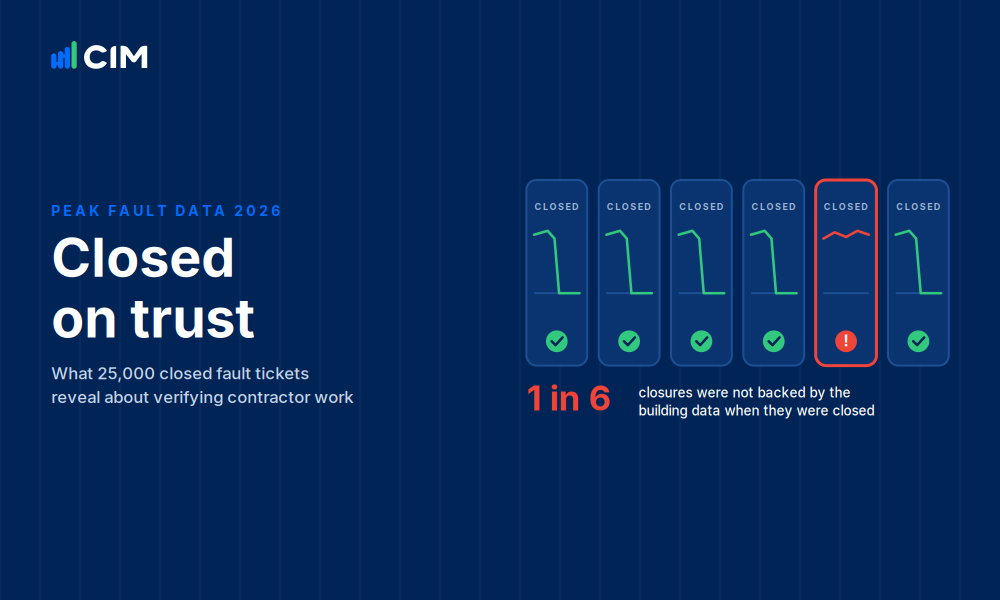
Verification is where independence matters most. A technician's close-out note records what was done; only the data shows whether it worked. In CIM's sample of closed fault tickets across commercial buildings, about 1 in 6 were closed before the data confirmed the fix, a pattern we cover in how to verify a contractor fixed an HVAC fault. Nobody should mark their own homework, and in a data centre the homework is the facility's redundancy.
This is also why a verifier should not be able to change what it verifies. A platform that can write setpoints can mask a fault as easily as fix one. Keeping FDD read-only keeps the evidence clean: every change to the plant is made by a person with access to the BMS, and every outcome is confirmed by a system that could not have made the change itself.
AI helps with the follow-through, not the control. An AI agent can triage new faults, assign them, chase owners when actions go stale and close them when the data confirms recovery, all without a write path. PEAK's AI connector also lets authorised users query their own fault and run-hour data from AI assistants. The AI recommends. Your engineers decide.
When is cloud FDD not the right fit for a data center?
Cloud-based FDD is not the right fit where policy mandates a true air gap or on-premise-only software, where the operator wants autonomous closed-loop control, or where the critical cooling telemetry is not exposed to the BMS. In those cases an on-premise analytics stack, or tools inside the OT boundary, will serve the facility better.
Being clear about this saves both sides time. The facilities that most often fall outside cloud FDD are government and defence sites, some financial services operators with strict data sovereignty rules, and hyperscale operators that run their own in-house analytics platforms. If your security policy rules out any telemetry leaving the site, no architecture diagram will change that, and a vendor who suggests otherwise is not taking your policy seriously.
Autonomous control is a different architecture by design. Platforms that optimise cooling by writing setpoints need a path back into the OT network, with safeguards to match, and that is a reasonable choice for some operators. It is not what FDD needs, and the two should not be bought as if they carried the same risk. At the other end of the scale, small edge rooms with no BMS are usually better served by DCIM or meter-level monitoring.
Where does CIM's PEAK Platform fit?
PEAK fits data centres that accept monitoring data leaving the site but not commands coming back in. It reads the existing BMS through an on-site collector or a scheduled export, runs engineering rules on the cooling plant, assigns each fault to a named owner and closes it only when the data confirms the fix held.
PEAK only reads. It does not command plant or alter the control strategy, and the only hardware on site is the BACER collector, which reads the BMS network; sites where a live connection is not allowed can send scheduled exports instead. Details of each connection path are on the BMS integrations page. PEAK also offers optional setpoint control in some commercial buildings, but that is a separate capability that has to be explicitly authorised, and nothing in this article depends on it.
PEAK is a cloud platform. It is hosted on Amazon Web Services in Sydney, encrypts data in transit with TLS, and runs a security programme that follows the SOC 2 framework, with independent penetration testing at least annually. Operators with data residency requirements should raise them with CIM before deployment. The CIM security page and the CIM and PEAK FAQ carry the details security teams usually ask for.
CIM monitors more than 700 commercial buildings covering more than 100 million square feet, with more than 5,000 engineering rules that deploy automatically and buildings typically live within about 30 days. CIM is fully independent and is not owned by any equipment, controls or BMS manufacturer. Commissioning firms use PEAK to carry their work past handover: Aero Performance Group grew its active project portfolio by 50% without adding resources after moving its RCx and MBCx work onto the platform. Before any deployment, ask CIM, or any vendor, to map your point list against the fault types above so you know exactly what will be covered.
Verification that never touches the controls
See how PEAK finds cooling faults, assigns them and verifies every fix from read-only BMS data. Commissioning and controls firms can talk to the partner team about carrying IST into ongoing verification.
Watch a PEAK demoTalk to our partner teamFrequently asked questions
Is cloud-based FDD safe for data centers?
It can be, if it is deployed monitoring-only. The FDD platform needs read permissions on the BMS and one encrypted outbound connection started from the site, with no inbound ports and no path for commands back into the OT network. The risk data centre operators guard against is remote control of plant, which FDD does not need.
What is fault detection and diagnostics for data centers?
Fault detection and diagnostics (FDD) for data centres is software that continuously analyses BMS data from the cooling plant to find faults, rank them by risk to redundancy, temperature and energy, and track each one until the data confirms the fix held. It checks whether the plant still behaves as it did at commissioning.
How is FDD different from DCIM?
DCIM manages the IT side of a data centre: racks, power chains, space and capacity. FDD analyses the mechanical plant, comparing what chillers, pumps, valves and CRAH units are doing with what the design intends. The two complement each other; DCIM shows how much capacity is planned, FDD shows whether the cooling plant can still deliver it.
Does FDD need write access to the BMS?
No. Fault detection, diagnosis and verification all work from read-only data: commanded values, feedback, run status and temperatures. Write access is only needed by platforms that change setpoints automatically, which is a different architecture with different risks. For a data centre, a read-only integration account is the safer default.
Which cooling faults does FDD find in data centers?
Common examples are standby units that cannot start or are left in hand, overrides left in place after maintenance, valves or dampers that ignore their command, CRAH units humidifying and dehumidifying at once, drifting supply or rack-inlet sensors, and chilled water resets or free cooling that never engage. Coverage depends on the points each site exposes.
How does FDD relate to integrated systems testing?
Integrated systems testing, Level 5 of data centre commissioning, proves on one day that the facility survives forced failures. FDD checks every day after that the conditions the test relied on still hold: standby units available, no overrides in place and sensors reading true. It is the continuous form of commissioning, often called monitoring-based commissioning.
Which data centers are not a good fit for cloud-based FDD?
Facilities whose policy mandates a true air gap or on-premise-only software, such as many government and defence sites, are not a fit for cloud FDD. Neither are operators who want autonomous closed-loop control, or small edge rooms with no BMS. Those sites are better served by on-premise analytics, control platforms or DCIM.