Your buildings generate millions of data points a day. Most teams only ever hear about the equipment that has already failed.
That is the gap Equipment Health closes. It is now live in CIM's PEAK Platform for all users, and it scores every piece of equipment continuously against its rules, so a portfolio has evidence for the plant that is working as well as the plant that is not. This post covers what the score is, how it is built, what the drill-down looks like on a real site, and what continuous scoring changes for the engineering and service partners who report on performance. You can watch the full walkthrough on the Equipment Health product update page.
Key takeaways
- Alerts tell you what broke. A score tells you what is working. Continuous scoring produces evidence for equipment that needs no attention, which is most of it.
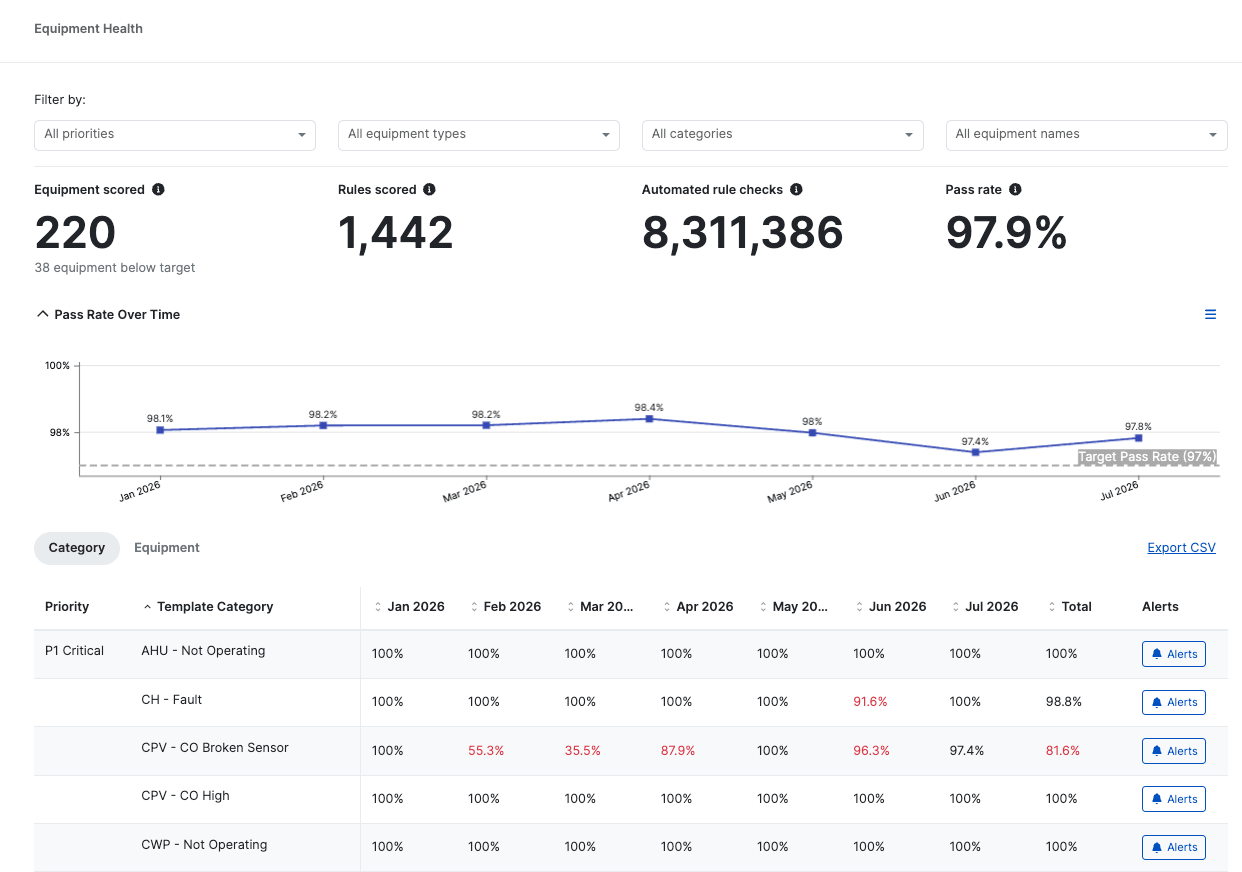
- Millions of checks become one number. On the site in the walkthrough, over 8.3 million automated checks across more than 1,400 rules resolved into a single pass rate.
- The score is tracked against a target, month on month. That turns a snapshot into proof of performance over time.
- Red shows you where to look. Performance breaks down by priority, category, equipment type and individual unit, so a declining fleet resolves to the two units dragging it down.
- Every score links back to the evidence. From a low number to the alert behind it, the live trend and the action already underway.
Why do building teams only hear about equipment that has already failed?
Because alerting is built to interrupt, not to report. An alert list is a queue of exceptions, so it can only ever describe what went wrong. It cannot tell an owner that eleven of thirteen air handling units ran to schedule all quarter, which is the question asked at every performance review.
This produces a familiar asymmetry. The maintenance conversation is dominated by failures, because failures are the only thing the system reports. Equipment that quietly did its job for six months generates no record at all, so it cannot be used as evidence, and the team that kept it running gets no credit for it.
It also makes trend impossible to see. A fleet that is slowly degrading does not announce itself until a unit crosses a threshold and raises an alert. By then the decline has been running for months. The same problem drives alarm fatigue: more alerts, less signal, and no way to tell whether the building is getting better or worse.
What is Equipment Health in PEAK?
Equipment Health scores every piece of equipment 24 hours a day against the rules that apply to it, and turns those automated checks into a single performance score per month. The score is tracked over time against the site's target pass rate, so a portfolio can show whether performance is holding, improving or slipping, rather than only reporting the faults raised this week.
The walkthrough uses a live site, and the scale of the arithmetic behind one number is the point. Over six months, PEAK scored 220 pieces of equipment across more than 1,400 rules, performing over 8.3 million automated checks. All of that resolves into a pass rate of 97.9%, with 38 pieces of equipment sitting below the site's target.
Figures from the live site shown in the Equipment Health walkthrough, not a portfolio average.
Three things are worth separating out of that. The scoring is continuous rather than periodic, so it reflects how plant actually ran rather than how it behaved during an inspection. The rules are the same engineering rules that raise faults, so the score and the alert list cannot disagree. And the target is the site's own, which means a score is read against what that building is expected to achieve rather than an abstract benchmark.
The full Equipment Health walkthrough, including the drill-down from a declining fleet to the two units causing it.
What does a pass rate show that an alert list cannot?
It shows the denominator. An alert list reports the faults raised; a pass rate reports those faults against every check that passed, which is the only way to say whether a building is performing. It also makes improvement visible, because the score moves after a fix in a way that a shrinking alert queue does not reliably show.
That second point is the one engineers tend to seize on. When a fault is closed, the alert disappears, and an empty queue looks identical whether the work was excellent or whether nobody was looking. A score that climbs the month after a repair, and holds the month after that, is evidence the fix landed. It is the same logic behind verifying that a contractor actually fixed a fault, applied to the whole asset rather than a single ticket.
High scores carry information too, and it is information most reporting throws away. In the walkthrough, central plant shows no major failures, air handling units are running to schedule and chillers are meeting their continuous assurance performance. None of that generates an alert. All of it is what an owner is paying to find out.
How do you find what is dragging a fleet's score down?
By narrowing, not by searching. Performance breaks down by priority and category first, so red shows where to look. From there you open an equipment type, see the fleet's score over time, switch to the individual units and identify the ones pulling the average down, then open the unit to see the category of issue behind it.
The walkthrough follows exactly that path, and it is worth tracing because it shows how few steps separate a portfolio number from a root cause.
That last step matters more than it sounds. A score that cannot be interrogated is a dashboard metric, and building teams have learnt to distrust those. A score that opens into the alert, the trend and the action already underway is a navigation tool, and it is why Equipment Health sits inside the alerts and actions workflow rather than beside it.
What does continuous scoring change for engineering and service partners?
It gives partners a reporting line they could not previously produce: evidence for the equipment that is performing. That changes the quarterly review from a list of what broke into a defensible account of how the portfolio ran, and it shows the value of work that would otherwise be invisible.
Three things shift in practice.
Good performance becomes reportable. A partner can show that the plant they maintain held its target, by unit, across the period. Until now the only evidence a contract produced was the fault log, which systematically understates the work.
Improvement is provable. Scores climbing after a remedial programme, and holding, is the clearest demonstration that the money did something. That is the same evidence a landlord asks for when evidencing PPM and remedial works, and it is far stronger than a completion percentage.
Declines are caught as trends. A fleet drifting down over two months is a conversation about a service visit. The same fleet after a failure is a conversation about a replacement. Scoring continuously moves more work into the first category, which also feeds the performance view behind condition-based capital planning.
Where does Equipment Health sit in the PEAK Platform?
Inside the existing alerts and actions workflow, not as a separate dashboard. Equipment Health is live in PEAK for all users, scoring equipment against the same engineering rules that raise faults, so a score always opens into the alert, the live trend and the action behind it.
That matters for how it is used. PEAK reads the existing building management system with no new hardware, and the rule library that produces the scores is the same one that drives detection across more than 700 commercial buildings and over 100 million square feet. Equipment Health does not add a second source of truth. It reports the one already there, in a form an owner can read.
It also completes a loop the platform already runs. Detection finds what changed, assurance decides whether it matters, escalation assigns it to a named owner, and governance confirms it was fixed. Equipment Health is the layer that reports the result of all four over time, which is what turns a month of tickets into a performance record. Our Building Performance Engineer's FDD Playbook covers how engineers work that loop day to day, and there is more on the underlying workflow in fault detection and diagnostics.
Now live in PEAK
See what needs attention, and what does not
Equipment Health is available to all PEAK users. If you are an engineering or service partner reporting on a portfolio, it is the evidence layer behind your quarterly review.
Frequently asked questions
What is Equipment Health in the PEAK Platform?
Equipment Health scores every piece of equipment continuously against the engineering rules that apply to it, and turns those automated checks into a single performance score per month. The score is tracked against the site's target pass rate over time, so a portfolio can show whether performance is holding, improving or declining.
How is an equipment health score calculated?
From the automated checks PEAK already runs. Each rule tests a piece of equipment continuously, and the proportion of checks that pass becomes the score for that unit, rolled up to equipment type, category and site. On the site in the walkthrough, more than 1,400 rules produced over 8.3 million checks across six months.
What is a pass rate in building analytics?
The share of automated rule checks a piece of equipment passes over a period. Unlike an alert count, it includes everything that passed, so it reports performance rather than exceptions. It is read against a target set for that site, which is what makes a given number good or bad.
How is Equipment Health different from an alert list?
An alert list reports only exceptions, so it describes what broke and never what worked. A health score reports the full denominator, which makes good performance evidenceable and makes gradual decline visible before a unit crosses a threshold and raises a fault.
Can you see which equipment is pulling a score down?
Yes. Performance breaks down by priority, category, equipment type and individual unit, so a declining fleet resolves to the specific units responsible. From a low score you can open the alert behind it, the recommended next steps and the live trends without leaving PEAK.
Is Equipment Health available to all PEAK users?
Yes. Equipment Health is live in the PEAK Platform for all users, built into the existing alerts and actions workflow rather than as a separate dashboard.

A practical playbook for the engineers who deliver building performance. Learn how to run retro-commissioning, monitoring-based commissioning and data-driven maintenance on an FDD platform: compress the RCx cycle from 12-18 months to 3-5, close the loop from alert to verified fix, and turn fixed-term projects into recurring revenue. Written for RCx and MBCx firms, engineering consultancies, and BMS and mechanical contractors.
Automated PEAK alerts enabled faster AHU repair with minimal disruption
Read the story →